 Select a country ▼
 GuruSoft
 Ecuador
 Colombia
 Bolivia
 Panama
 Dominican Republic
 Costa Rica
 Paraguay
 Peru
Peru Guatemala
 El Salvador
 Spain
Spain France
 Angola
Invoice electronically from your ERP or invocing system, whenever you need
When you invoice with GuruSoft you feel the change and so do your clients!
Fill out this form to provide you with information about our Electronic Invoicing services
ELECTRONIC INVOICING
Why is the process of
Electronic Invoicing work?
Tax Documents
XML file storage for 5 years
Export invoice
Contingency Invoice
Electronic Debit Note
Electronic Credit Note
Supporting document for obligated taxpayers
Supporting document for non-obligated taxpayers
Standard Invoice
High transactionality and availability of our services
We have a high availability and disaster recovery scheme in our Amazon Web Services private cloud, providing our customers with the assurance that their invoice process will not be affected at response time.

GuruSoft is a DIAN authorized and
certified provider
We comply with the conditions and requirements established in Article 616-4 of the Tax Statute, authorized by the DIAN, to provide electronic billers, among others, with the services of generation, transmission, delivery and/or issuance, receipt and conservation of electronic sales invoices.

Latest resolutions:
By which some articles are modified and added to Resolution 000042 of May 5, 2020 and other provisions are established.
By which the functionality of the electronic payroll support document is implemented and developed in the electronic invoicing system and the technical annex for this document is adopted.
By which the functionality of the electronic payroll support document is implemented and developed in the electronic invoicing system and the technical annex for this document is adopted.
Our solutions for your business
Integration for
SAP Business One
The eDoc AddOn is an add-on for SAP Business One; that extends the functionality of the system. By adding screens, buttons and validations, it allows you to issue and receive electronic documents without altering the business logic. All without leaving the screens of SAP BUSINESS ONE!
Integration for
SAP R3, ECC, S/4
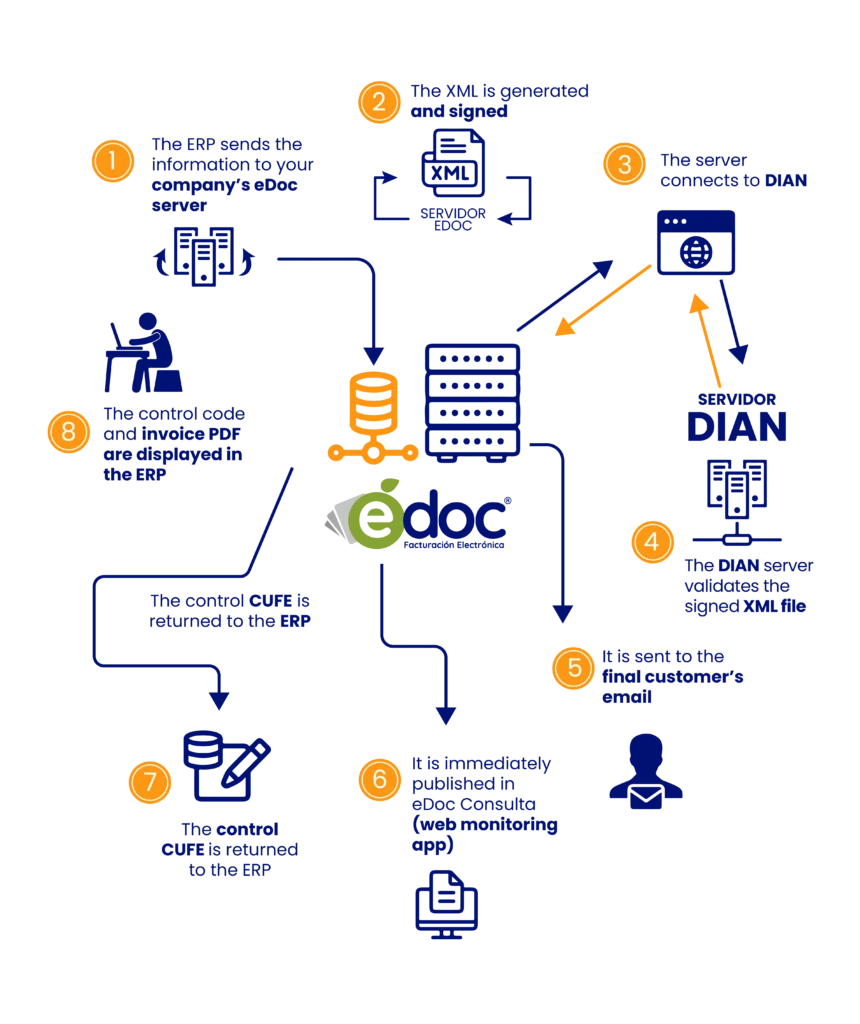
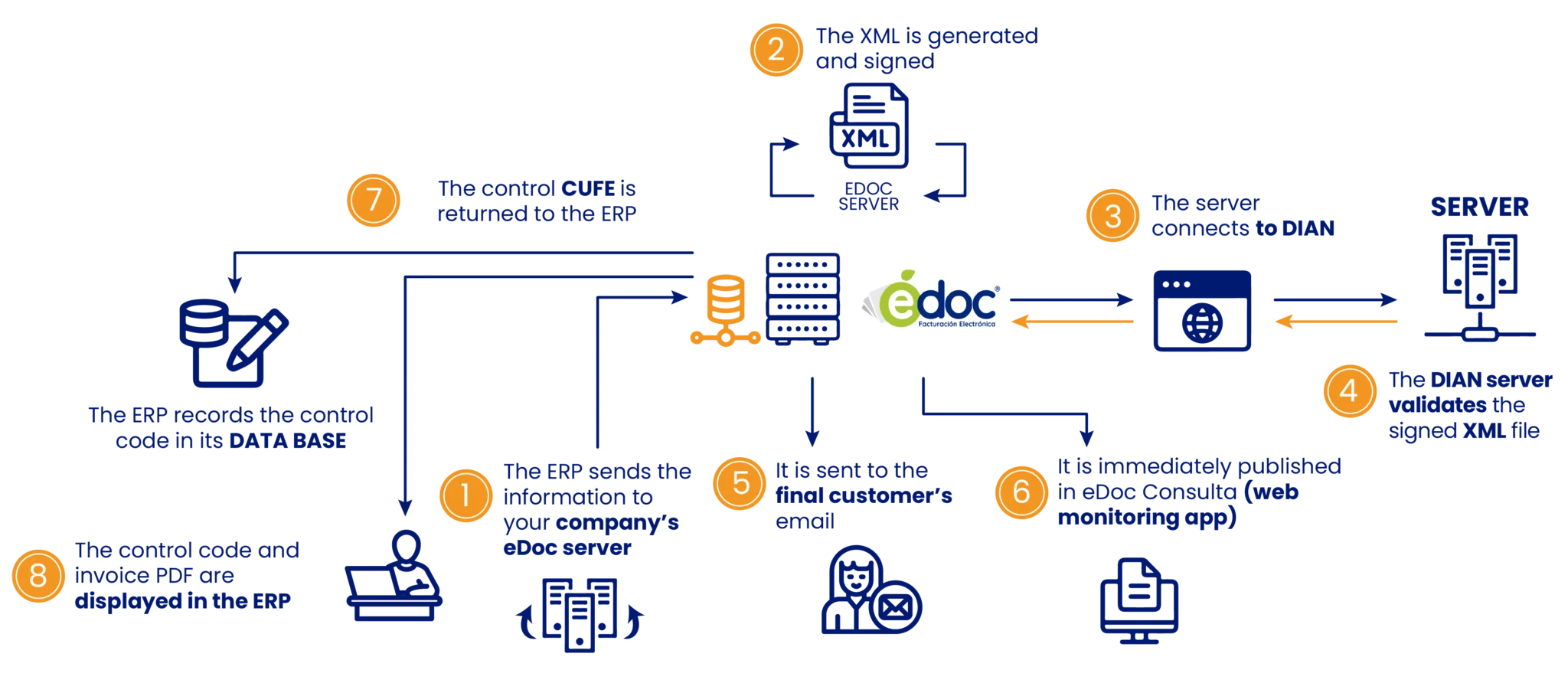
Native integration for SAP R3 allows you to issue and receive electronic documents. This solution is composed of a connector that is responsible for sending the information from the ERP to the eDoc server hosted in the cloud; in that instance, it validates the veracity of the data, to later create the XML and, once this document is prepared, sign it, assign a code and send it to the DIAN for final validation.
Integrations on
Other ERPs or invoicng systems
We know the complexity of implementing electronic invoicing in large and medium-sized companies throughout Latin and Central America, which has allowed us to develop a very stable product, with easy integration to your ERP and a quick implementation.
Integration with
Point of sale
It allows detecting the electronic documents that arrive at the ERP from the point of sale and subsequently sending them for their respective authorization. All this makes it possible to automate the process so that the user does not have to manually resend each document to the tax entity.
eDocPYME
Integrated invoicing system that has the necessary tools to issue and receive electronic documents in an easy and dynamic way.
Frequently Asked Questions
It is a sales document that is part of invoicing systems It supports transactions involving the sale of goods and/or the provision of services, in accordance with Article 616-1 of the Tax Statute.
Operationally, it is generated through IT solutions that enable compliance with the requirements, characteristics, conditions, terms, and technical and technological mechanisms established by DIAN, and it must be validated by DIAN before being issued to the buyer.
-
They are those that allow changes, cancellations, adjustments and/or corrections to be made to electronic invoices, such as:
- Credit note: cancel.
- Nota de débito: modificar, ajustar o corregir.
Debit notes and credit notes are electronic documents that derive from the sale of goods and/or provision of services that have been previously invoiced, whether or not associated with an electronic sales invoice.
The subjects obliged to invoice are natural or legal persons and other subjects that must comply with the formal obligation to issue a sales invoice and/or equivalent document, for each and every one of the sales operations of goods and/or services; attending to the invoice system that corresponds to it in accordance with the conditions, terms, technical and technological mechanisms. Special Administrative Unit of the National Tax and Customs Directorate – established by the DIAN.
See if you’re required to check-in: https://www.dian.gov.co/impuestos/sociedades/Paginas/obligadosfacturar.aspx
https://www.dian.gov.co/impuestos/sociedades/Paginas/obligadosfacturar.aspx
It is a tool that is used to sign electronic documents. It guarantees the authenticity, integrity and non-repudiation of the electronic sales invoice.
According to Article 652 of the Tax Statute, if you issue the invoice without the requirements demanded by the DIAN, you will incur a penalty of (1%) of the value of the invoiced operations without complying with the legal requirements, not exceeding 950 UVT. When there is a repeat offense, the Article 657 which indicates that the DIAN It may impose the sanction of closure or closure of the commercial establishment, office, office and, in general, of the place where the activity, profession or trade is exercised, through the imposition of official stamps that will contain the legend “CLOSED BY THE DIAN”.
They have a period of two (2) months, from the date on which the obligation is acquired as subjects obliged to issue a sales invoice and/or equivalent document.
When the biller is unable to issue the electronic invoice due to technological inconveniences, it can invoice through contingency invoices, whose numbering must have been previously requested from the DIAN.
The technological drawbacks of electronic invoicing mean that electronic invoicing has the following characteristics:
- Issue a bill of sale in a cheque book or paper.
- The electronic biller must generate a letter declaring the technological inconvenience or overcoming it, which must be signed by the company’s legal representative and sent to the email contingencia.facturadorvp@dian.gov.co with the following:
- Subject: NIT of the company with verification code; Company name.
- Adjunto: PDF de la carta donde se declaren en contingencia con la firma del representante legal.
- Body of the email: Contact details (Names, telephone/cell phone of contact).
Note: This email will only be for the receipt of emails from electronic billers to inform of the contingency or overcoming of technological inconveniences.
Additionally, if they want to deliver these certificates in writing, they can do so through filados, which must be sent to the DIAN – central level – electronic invoice.
- The biller will send the electronic transmission document within 48 hours of the moment the inconvenience is overcome.
- Once the electronic invoicing system overcomes the technological inconvenience, it must proceed to the normal generation process.
Electronic invoicing in the cloud means that we do not need to download any program on the computer, it already works with the internet through our web service channel, entering through a web browser through a computer or mobile device.
Step by Step
- Log in to https://muisca.dian.gov.co/WebArquitectura/DefLoginOld.faces with your data
https://muisca.dian.gov.co/WebArquitectura/DefLoginOld.faces - Select invoice numbering
- Again select invoice numbering
- Select Request invoice Numbering
- Select OK (updated RUT)
- Select Login
- Select Authorize Ranges
- Enter prefix: letters (in case you see it necessary or manage several branches)
- Enter Invoicing Type: Electronic Sales Invoicing
- Select branch: the one indicated to the DIAN appears (in some cases it does not appear)
- Enter invoice Range.
- Form: 1
- Up to: 1,000 (the range you see fit)
- Select Add
- Select Draft
- Accept
- Select Definitive
- A box appears which must request a dynamic password which will arrive at the email provided in the DIAN
- Then you must enter the key of your DIAN electronic signature
- Select sign (this process must be done 2 times as this resolution must be signed 2 times)
